Keyboard sizes explained: which keys each layout drops
Full size, 96%, TKL, 75%, 65% and 60% compared by the keys each drops or moves behind Fn, what that costs in Excel and editing, and which size suits which job.

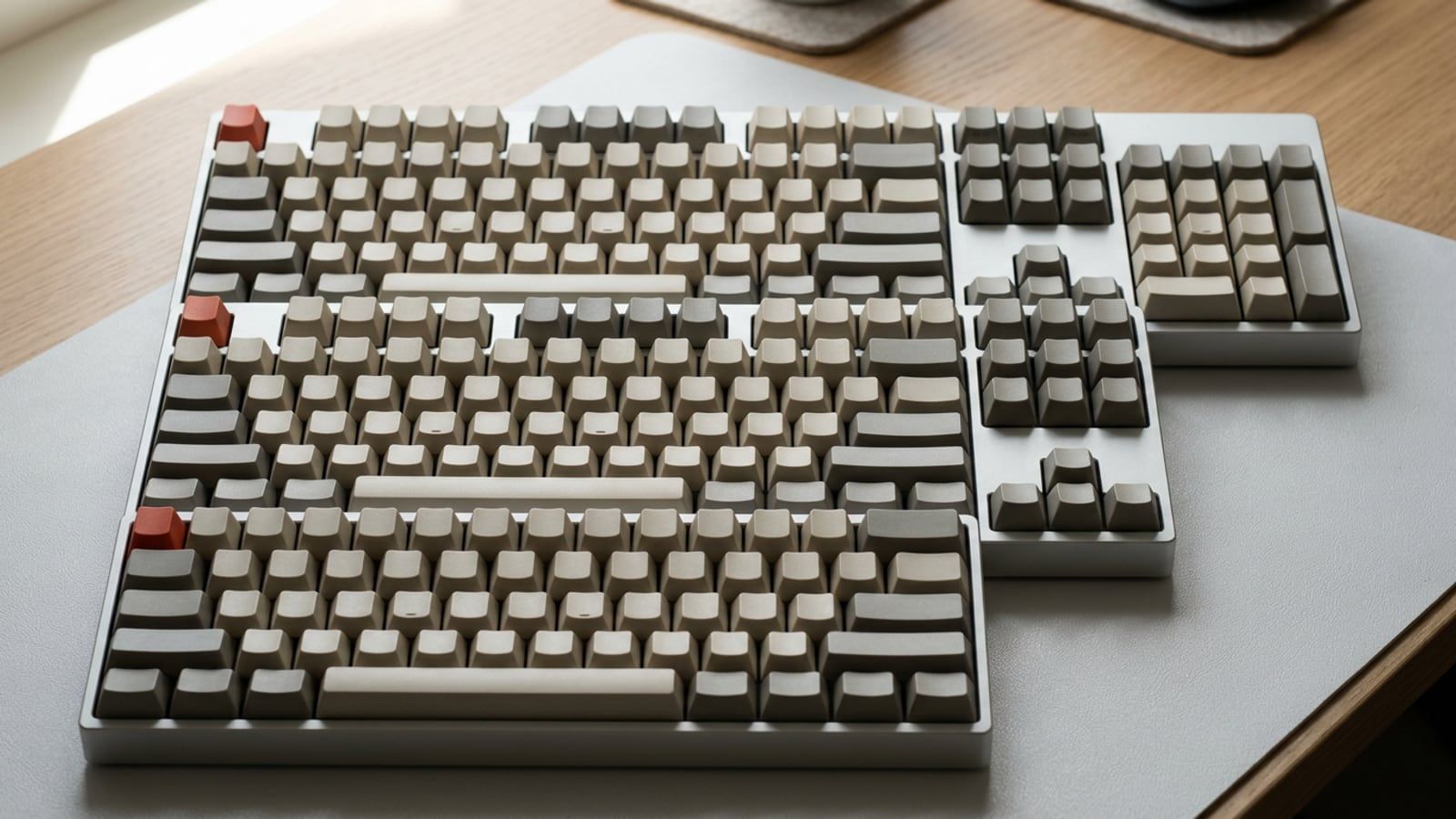
The short versionA TKL drops only the number pad, a 75% keeps the function row and the arrows but packs the keys together, and 65% and 60% boards move the function row, then the arrows, behind Fn. Keep the number pad if you type figures every day, and stop at 75% if you press F2, F4, Home or End on Windows, because smaller boards turn them into Fn combos.
Keyboard sizes are named for how much of a full-size board they keep, and each step down takes keys away from the right-hand side first. A TKL drops the number pad. A 75% keeps the function row and the arrows but closes the gaps and drops a few keys hardly anyone presses. A 65% moves the function row behind Fn, and a 60% moves the arrows there too. For work, the question isn’t which size looks tidiest on the desk; it’s which of the keys you press all day you’re willing to reach through Fn.
The key counts below are Keychron’s, for its US layouts, from its keyboard size and layout guide. Other makers’ boards of the same size can have a key or two more or fewer, so check the key map of the one you’re looking at.
The sizes at a glance
The widths are side to side, from Keychron’s product pages for its V Max range, one board per size, so they compare like with like.
| Size | Also called | Keys | What it drops | Width (Keychron) |
|---|---|---|---|---|
| 100% | Full size | 104 | Nothing | 17.6 in (V6 Max) |
| 96% | Compact full size | 100 | Print Screen, Scroll Lock and Pause; the rest pushed together | 15.4 in (V5 Max) |
| 80% | Tenkeyless (TKL) | 87 | The number pad | 14.5 in (V3 Max) |
| 75% | Compact tenkeyless | 84 | The number pad, plus Insert, Print Screen, Scroll Lock and Pause | 12.9 in (V1 Max) |
| 65% | Compact | 68 | The number pad, the function row and some navigation keys | 13.0 in (V2 Max) |
| 60% | Mini | 61 | The number pad, the function row, the navigation keys, the arrows | 12.0 in (V4 Max) |
Outside the US, most PC keyboards have 105 keys rather than 104. The ISO layout, common in Europe, has a tall Enter key and a short left Shift that makes room for the extra key; Wikipedia’s article on keyboard layouts sets the physical layouts side by side.
Full size and 96%: the number pad stays
A full-size board has everything: the function row, the six editing keys (Insert, Home, Page Up, Delete, End, Page Down), the arrows in a block of their own, and the number pad. If you type figures all day, the number pad is the reason to buy one: the digits, the four operators and an Enter key under one hand, laid out like a calculator. Since Excel’s Enter moves down a cell, a column of figures goes in without the hand leaving the pad.
The cost is width. Keychron’s V6 Max is 17.6 inches across, and Logitech’s full-size MX Keys S, on our Kit, is 16.94 inches.
A 96% keeps the number pad and closes the gaps. Keychron’s 96% layout drops Print Screen, Scroll Lock and Pause and packs the rest together, which takes its V5 Max down to 15.4 inches. The editing keys move in among the arrows and the number pad, and where they land differs from maker to maker. Losing Print Screen costs nothing: Win+Shift+S on Windows and Cmd+Shift+4 on a Mac capture part of the screen without it.
TKL: everything but the number pad
Tenkeyless means without the ten number keys, and the number pad is the only thing a TKL drops. The function row, the six editing keys and the arrows keep their full-size places, so nothing your hands already know moves. Keychron’s V3 Max is 14.5 inches across, 3.2 inches narrower than its full-size board. That makes a TKL the safe step down for anyone who rarely types figures: the digits on the top row still work everywhere, and what you give up is the calculator layout.
75%: the function row, squeezed in
A 75% keeps the function row and the arrows and drops the gaps between the blocks. Keychron’s 84-key layout loses the number pad plus Insert, Print Screen, Scroll Lock and Pause, and keeps Delete, Home, End, Page Up and Page Down, packed in at the right-hand edge with the arrows tucked into the bottom corner. Keychron points out that most laptops use a similar layout, so for a laptop user a 75% is often the size closest to what the hands already know.
Keychron’s V1 Max is 12.9 inches across, 1.5 inches narrower than its TKL. Its slim K3 Max fits the same 84 keys, on low-profile switches, into 12.04 inches, about the width of Keychron’s 60%. Both are on the Kit. With the gaps gone, makers place the editing keys differently, so check the key map for where Home and End landed before you count on finding them by feel.
65% and 60%: keys behind Fn
A 65% removes the function row. Keychron’s 68-key layout keeps the arrows and the editing keys used most, and reaches the F keys and the rest through combinations with Fn. On most boards F1 to F12 move onto the number row, so F2 becomes Fn+2; the key map in the manual shows where yours puts them.
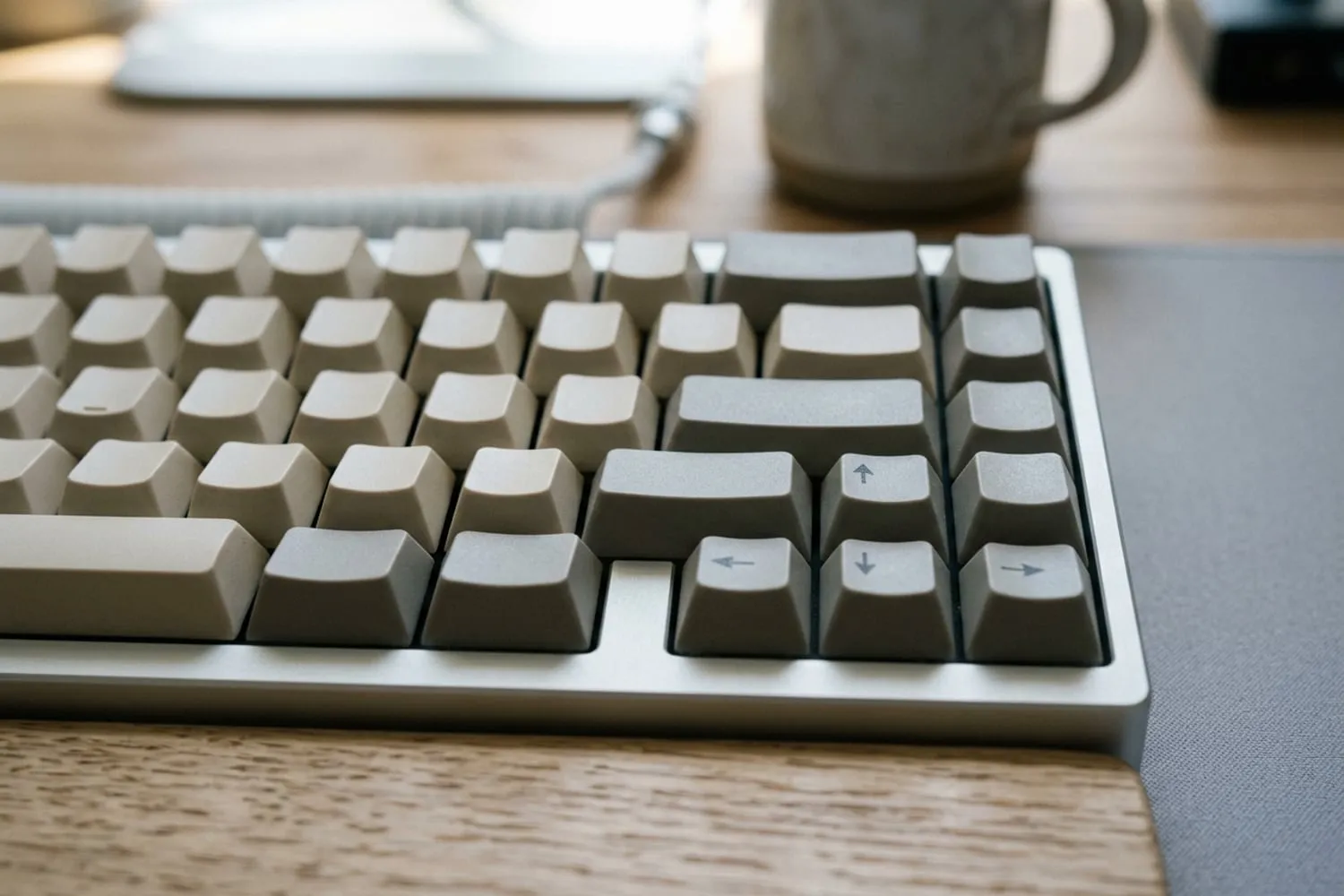
A 65% is no narrower than a 75%. Keychron’s V2 Max (65%) and V1 Max (75%) are both about 13 inches across; the 65% saves depth instead, about an inch from front to back, where the function row was. If you’re going smaller for mouse room, a 65% gives you none over a 75%.
A 60% goes further: no function row, no editing keys and no arrows, all of them on layers. Keychron’s V4 Max is 12.0 inches across, about an inch narrower than its 75%. The arrows are the costly loss for work, because every text-editing shortcut is built on them: moving a word at a time is Option+Left on a Mac and Ctrl+Left on Windows, and on a 60% each needs Fn as well. Smaller boards still, like the 52-key split ZSA Voyager on the Kit, are built around layers you lay out yourself in the maker’s software: worth it if you want to decide where every key goes.
What each size costs in shortcuts
The keys a small board hides are the ones office shortcuts lean on. The shortcuts named here match Shortcut Sheets, checked October 28, 2026 for Excel for Microsoft 365, Visual Studio Code 1.143, macOS 27 and Windows 11; the layouts are Keychron’s.
| Key | Full size and 96% | TKL | 75% | 65% | 60% |
|---|---|---|---|---|---|
| Number pad | Own keys | None | None | None | None |
| F1 to F12 | Own row | Own row | Own row | Behind Fn | Behind Fn |
| Home, End, Page Up, Page Down | Own keys | Own keys | Own keys | Some own, rest behind Fn | Behind Fn |
| Arrows | Own keys | Own keys | Own keys | Own keys | Behind Fn |
On Windows
F2 edits the active cell in Excel and F4 locks a reference with $ while you’re in a formula: two of the twenty keys on the Excel Shortcut Sheet, and on a 65% or a 60% both become Fn combos. So do F2 to rename a file in File Explorer (Return in the Finder on a Mac), and F2 to rename a symbol and F12 to go to its definition in VS Code, which are the same keys on both systems. On a 60%, Ctrl+Page Down and Ctrl+Page Up, Excel’s keys for the next and previous sheet, need Fn too, and so does every Ctrl+Arrow jump to the edge of the data. Home and End are the line keys on Windows, so a writer loses them on a 60%, and possibly on a 65%.
On a Mac
A Mac leans on the function row less. Excel for Mac gives those two jobs keys of their own, Ctrl+U to edit the cell and Cmd+T to lock a reference, and the line keys are Cmd+Left and Cmd+Right, so a 65% costs a Mac user little in a spreadsheet or a document. On a 60%, though, the arrows behind Fn add a key to every one of those combos, and to Option+Right and Option+Left, Excel’s keys for the next and previous sheet.
The top row on a Mac controls brightness, volume and media until you hold Fn, the Globe key on newer keyboards. To make it send F1, F2 and so on without Fn, Apple’s page on using the function keys gives the setting: System Settings, Keyboard, Keyboard Shortcuts, Function Keys, then “Use F1, F2, etc. keys as standard function keys.” Third-party keyboards often decide what the top row sends in their own firmware, so if the setting changes nothing, check the keyboard’s manual.
Every Excel key by task, Mac and Windows side by side, is in Excel keyboard shortcuts for Mac and Windows.
Mouse reach and desk width
For a right-handed mouse user, everything a full-size board has to the right of the letters sits between your two hands, so each size down lets the mouse move in by what it saves. Against Keychron’s full-size V6 Max, its 96% is 2.2 inches narrower, its TKL 3.2 inches, its 75% 4.7 inches and its 60% 5.6 inches.
Most of that comes from dropping the number pad and the gaps around the editing keys, which a TKL and a 75% already do; below 75% the steps are small. Left-handed mouse users gain nothing on that side, since the number pad was never in the way. Where the keyboard sits matters as much as its width: centering the letters in front of you, rather than the whole board, and where the mouse goes beside it, are covered in the ergonomic desk setup checklist.
Which size for which job
- Figures every day (accounts, data entry, budgets): a full size or a 96%, which keeps the number pad in 2.2 inches less width.
- Spreadsheets without much number entry: a TKL or a 75%. Both keep F2, F4, Home, End, Page Up, Page Down and the arrows on keys of their own, which matters most in Excel on Windows. If figures come in bursts, a separate number pad can sit to one side until month end.
- Writing: a 75%, the narrowest board that keeps the line and page keys and the arrows. A 65% works on a Mac, where the line keys are Cmd+Left and Cmd+Right; on Windows, check where Home and End went.
- Code: a TKL or a 75%. Editors lean on the function row (F2 and F12 in VS Code) and on Home, End and the arrows.
- Two systems on one desk: the switching matters more than the size. The V1 Max comes with Mac and Windows keycaps and a system switch, and the V1 Max, the K3 Max and the MX Keys S each pair with three devices. All three are on the Kit.
- A laptop that moves between desks: a slim 75% like the K3 Max, 12.04 inches across and laid out much like a laptop keyboard.
- Already at home on layers: a 60%, or a split board with fewer keys still. Otherwise the arrows behind Fn add a key to every edit.
Size settles which keys you get; the switch under each key settles how the press feels and how much the room hears it. That’s the next choice: linear, tactile or clicky switches explained. More on choosing a keyboard for work is in the Keyboards section.
Questions
What is the difference between a 75% and a TKL keyboard?
Both drop the number pad and keep the function row, the arrows and the main editing keys. A TKL keeps those keys in their full-size places, with gaps between the blocks; a 75% packs them together and, in Keychron’s layout, drops Insert, Print Screen, Scroll Lock and Pause. That makes Keychron’s 75% V1 Max about 1.5 inches narrower than its TKL V3 Max.
Is a 65% keyboard good for work?
It is if you rarely press the F keys or don’t mind reaching them through Fn. On a Mac, Excel and text editing barely touch the function row; on Windows, F2 and F4 in Excel, F2 to rename a file, and sometimes Home and End become Fn combos. A 65% is also no narrower than a 75%, only about an inch shallower, so it gives the mouse no extra room.
Do I need a number pad?
Only if you type figures often: the number pad puts the digits, the four operators and an Enter key under one hand. If numbers come now and then, the top row does the job, and a separate number pad can come out when the figures do. Everything else a full-size board has also fits on a TKL.
Which keyboard size is best for Excel?
A full size or a 96% if you enter figures, and a TKL or a 75% if you mostly move, select and format. All four keep F2 and F4, which Excel on Windows uses to edit a cell and lock a reference, along with the arrows and Page Up and Page Down. Excel for Mac uses Ctrl+U and Cmd+T for those two jobs, so a 65% costs a Mac user less.
Sources
- Keyboard Size & Layout Buying Guide, Keychron,
- Keyboard layout, Wikipedia
- How to use the function keys on your Mac, Apple Support
- Keychron V1 Max QMK/VIA Wireless Custom Mechanical Keyboard, Keychron
spaceShortcut Sheets: the twenty keys to learn first in each appFind your app